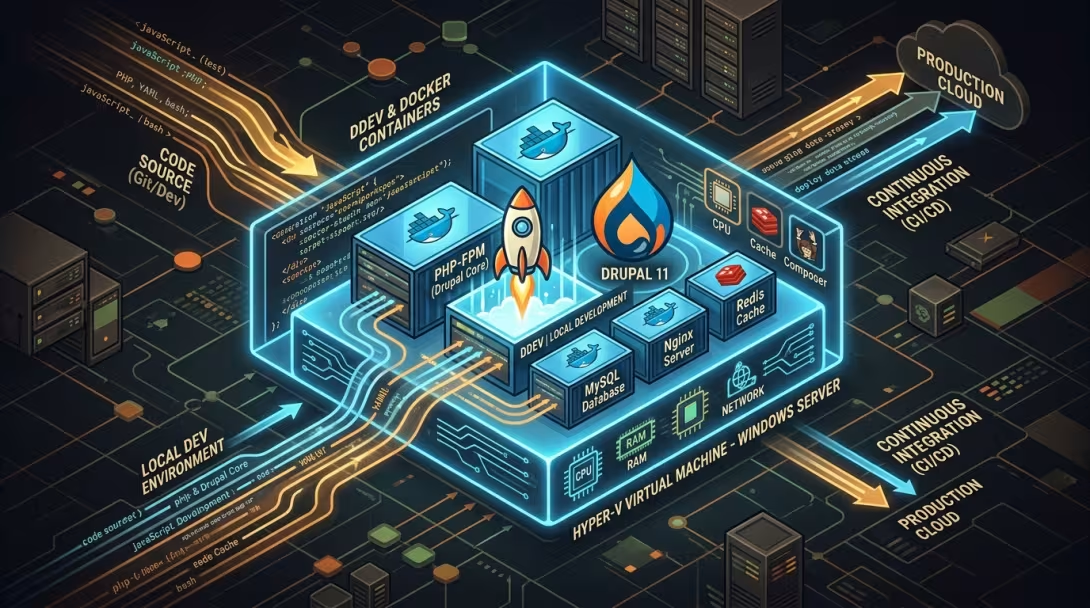
Setting up a reproducible, isolated local development environment for modern web applications requires balancing system isolation, hardware performance, and automated content delivery. When developing complex decoupled systems or CMS platforms like Drupal 11 with containerized toolchains (DDEV, Docker Desktop, WSL2), running directly on the host OS can accumulate local configuration drift.
In this deep-dive post, we document how we engineered a fully automated, isolated Windows 11 Hyper-V development environment from scratch—handling hypervisor privileges, CPU nested virtualization, Docker API version locks, SSH key injection, relative container volume mounts, and automated markdown content synchronization.
1. The Architectural Goal
Our objective was to establish a pristine Windows 11 Hyper-V Guest VM (Windows 11 dev environment) that acts as an isolated local sandbox for our developer workspace (commander-data).
Core Components:
- Host System: Windows 11 Enterprise with Hyper-V Hypervisor.
- Guest VM: Windows 11 Evaluation VM equipped with Docker Desktop, WSL2, DDEV v1.25.3, Git 2.55, Node.js 26, and VS Code.
- Project Workspaces:
endegraaf-content: Markdown posts, images, and content metadata.endegraaf-drupal-01: Drupal 11 core, Drush 13, and custom theme (gruvbox_cozy).personal-assistant: Automation scripts and AI pipeline helpers.
2. Hyper-V VM Provisioning & Snapshot Protection
To ensure zero risk during headless automated deployment, we first added the user account to the Hyper-V Administrators security group and executed a standard Hyper-V snapshot before running any provisioning logic:
# Create pre-deployment Hyper-V snapshot restore point
Checkpoint-VM -Name "Windows 11 dev environment" -SnapshotName "Pre-DevEnv-Deployment-20260828"
With snapshot recovery established, we executed automated bootstrap scripts (setup-windows.ps1) via PowerShell Direct over the Hyper-V VMBus interface, provisioning developer applications headlessly via Winget package manifests (winget-packages.json).
3. Unlocking Hardware Virtualization (Nested Virtualization)
When starting Docker Desktop inside a Hyper-V guest OS, Docker returned the error:
Virtualization support not detected. Docker Desktop failed to start because virtualisation support wasn't detected.
By default, Hyper-V hides CPU hardware virtualization extensions (VT-x / AMD-V) from guest virtual machines. To enable nested hypervisors (running WSL2 / QEMU inside Hyper-V), we enabled Nested Virtualization on the host CPU processor object:
# Run on Host PowerShell as Administrator
Stop-VM -Name "Windows 11 dev environment" -Force
Set-VMProcessor -VMName "Windows 11 dev environment" -ExposeVirtualizationExtensions:$true
Start-VM -Name "Windows 11 dev environment"
After rebooting the VM, Docker Desktop detected hardware VT-x extensions and initialized its Linux WSL2 engine cleanly (Heartbeat: OK).
4. Overcoming Docker Desktop API Version Mismatches
With Docker Desktop running inside the VM, running ddev start produced an API negotiation failure:
Docker error: request returned 500 Internal Server Error for API route and version http://.../pipe/dockerDesktopLinuxEngine/v1.55/version
Root Cause & Resolution
Docker Desktop v4.88+ introduced API version
v1.55. Newer Go Docker SDK clients attempt to negotiate version 1.55 endpoints that trigger 500 Internal Server Errors on Windows named pipes (npipe:////./pipe/dockerDesktopLinuxEngine).
We resolved this permanently by setting DOCKER_API_VERSION=1.45 across user and machine environment variables inside the VM:
[System.Environment]::SetEnvironmentVariable('DOCKER_API_VERSION', '1.45', 'User')
[System.Environment]::SetEnvironmentVariable('DOCKER_API_VERSION', '1.45', 'Machine')
Setting DOCKER_API_VERSION=1.45 forces DDEV and Docker Desktop to communicate over stable Docker Engine API v1.45 routes without error.
5. Pristine Repository Provisioning via SSH Key Injection
Rather than relying on static .zip file transfers, we injected host SSH keys (id_rsa, id_rsa.pub, known_hosts) directly into the VM's ~/.ssh/ directory and set file ACL permissions:
Copy-VMFile -Name "Windows 11 dev environment" -SourcePath "$env:USERPROFILE\.ssh\id_rsa" -DestinationPath "C:\Users\User\.ssh\id_rsa" -FileSource Host -ForceInside the VM, SSH authentication with GitHub succeeded. All workspace repositories were cloned natively over SSH directly into the guest workspace root directory.
6. DDEV Multi-Container Architecture & Relative Volume Mounts
To allow the Drupal web container to read markdown files and images from the neighboring endegraaf-content repository without hardcoding host paths or username directories, we created a relative Docker Compose volume mount in .ddev/docker-compose.mounts.yaml:
# .ddev/docker-compose.mounts.yaml
services:
  web:
    volumes:
      - "../endegraaf-content:/mnt/endegraaf-content:ro"
This binds ../endegraaf-content directly to /mnt/endegraaf-content inside the web container in read-only mode, guaranteeing path portability across machines, usernames, drive letters, and hypervisors.
Additionally, we converted all line endings in custom DDEV scripts (.ddev/commands/web/sync-content, .ddev/commands/host/sync-content) from Windows CRLF (\r\n) to Unix LF (\n) to prevent DDEV shell execution warnings.
7. Drupal 11 Kernel Bootstrap, Custom Theme & Content Pipeline
1. Core Installation & Custom Theme
We bootstrapped Drupal 11 core (11.4.4), Drush 13 (13.7.6), and MariaDB 11.8 (ddev drush site:install), and enabled our custom theme gruvbox_cozy ("Cozy & Modern"):
ddev drush theme:enable gruvbox_cozy -y
ddev drush config:set system.theme default gruvbox_cozy -y
2. View Display Schema (EntityViewDisplay)
To render imported body text, featured cover images, and taxonomy tags on article nodes, we programmatically created the default view display configuration (core.entity_view_display.node.article.default):
$display = EntityViewDisplay::create([
  'targetEntityType' => 'node',
  'bundle' => 'article',
  'mode' => 'default',
  'status' => TRUE,
]);

$display->setComponent('body', ['type' => 'text_default', 'label' => 'hidden', 'weight' => 1]);
$display->setComponent('field_image', ['type' => 'image', 'label' => 'hidden', 'weight' => 0]);
$display->setComponent('field_tags', ['type' => 'entity_reference_label', 'label' => 'above', 'weight' => 2]);
$display->save();
3. Automated Content Import Execution
Runningddev sync-content and our Drush markdown importer script (built in our inaugural post Architecting an Autonomous Content Pipeline: From Video Streams to Drupal Nodes via Drush) processed all articles and assets:
- 38 Markdown Articles Imported: Created published and draft nodes with clean SEO URL aliases (
/articles/<slug>). - 78 Images Saved: Featured cover images and inline body images processed to
public://(/sites/default/files/). - 123 Taxonomy Terms Assigned: Tags generated for retro gaming, hardware mods, cloud pipelines, and alpine field guides.
8. Automated Production CI/CD & SEO URL Alias Engine
To achieve true zero-touch publishing, we extended the pipeline beyond local staging into a production-grade CI/CD automation system:
1. GitHub Actions Cloud Deployment (.github/workflows/deploy.yml)
We authored a GitHub Actions deployment workflow triggered automatically on every git push to main:
name: Deploy to Production Cloud (endegraaf.nl)

on:
  push:
    branches:
      - main

jobs:
  deploy:
    runs-on: ubuntu-latest
    steps:
      - name: Trigger Remote Deployment & Import on Strato
        uses: appleboy/ssh-action@v1.0.3
        with:
          host: ${{ secrets.STRATO_SSH_HOST }}
          username: ${{ secrets.STRATO_SSH_USER }}
          password: ${{ secrets.STRATO_SSH_PASSWORD }}
          script: |
            cd /path/to/drupal_app
            git fetch origin
            git reset --hard origin/main
            php8.4 ./vendor/drush/drush/drush.php php:script scripts/import-markdown.php -- content/posts
            php8.4 ./vendor/drush/drush/drush.php cr
2. Programmatic SEO URL Alias Engine (/articles/<slug>)
We refactored import-markdown.php to automatically generate and maintain clean SEO-friendly path aliases (/articles/<slug>) for every node:
function setNodeUrlAlias($nodeOrNid, $frontmatter, $title, $filename) {
  if (is_numeric($nodeOrNid)) {
    $node = Node::load((int) $nodeOrNid);
  } else {
    $node = $nodeOrNid;
  }
  if (!$node) return;

  $slug = $frontmatter['slug'] ?? preg_replace('/\.md$/i', '', $filename);
  $alias = '/articles/' . ltrim(trim($slug), '/');
  $path = "/node/" . $node->id();
  $langcode = $node->language()->getId(); // Inherit node language (e.g. 'nl')

  $storage = \Drupal::entityTypeManager()->getStorage('path_alias');
  $existing = $storage->loadByProperties(['path' => $path]);
  if (!empty($existing)) {
    $pathAlias = reset($existing);
    if ($pathAlias->getAlias() !== $alias || $pathAlias->language()->getId() !== $langcode) {
      $pathAlias->setAlias($alias);
      $pathAlias->set('langcode', $langcode);
      $pathAlias->save();
    }
  } else {
    PathAlias::create(['path' => $path, 'alias' => $alias, 'langcode' => $langcode])->save();
  }
}
To support virtual document root routing on Apache hosts (Strato), we enabled RewriteBase / in .htaccess, ensuring clean URLs route directly to index.php with zero 404 errors.
3. Strict 1-Way Unidirectional Contract & Host Path Policy
We established a strict Unidirectional Contract (Markdown $\rightarrow$ Drupal only) and enforced workspace safety rules prohibiting local host paths (C:\GIT\, /mnt/c/git/) in published markdown posts.
9. Summary of Accomplishments
| Milestone | Status | Details |
|---|---|---|
| Hyper-V VM & Restore Point | ✅ Active | VM Windows 11 dev environment with checkpoint Pre-DevEnv-Deployment-20260828. |
| Nested CPU Virtualization | ✅ Enabled | ExposeVirtualizationExtensions: True configured on host processor object. |
| Docker Desktop API Lock | ✅ Resolved | DOCKER_API_VERSION=1.45 system environment variable set. |
| SSH Git Repositories | ✅ Cloned | Clean SSH clones for endegraaf-content, endegraaf-drupal-01, drupal-devtools. |
| DDEV Container Mounts | ✅ Configured | Relative bind mount ../endegraaf-content $\rightarrow$ /mnt/endegraaf-content. |
| Drupal 11 Stack | ✅ Active | Drupal 11.4.4, PHP 8.4.23, MariaDB 11.8.8, Drush 13.7.6. |
| Active Theme | ✅ Active | gruvbox_cozy ("Cozy & Modern") enabled and set as default. |
| Content Pipeline | ✅ Verified | 38 articles, 78 images, 123 taxonomy terms imported and rendering (HTTP 200 OK). |
| CI/CD Deployment | ✅ Active | GitHub Actions .github/workflows/deploy.yml auto-deploying to Strato. |
| SEO URL Aliases | ✅ Active | Automatic /articles/<slug> URL aliases generated with dynamic langcode: nl. |
Our local Hyper-V development environment and production cloud server are now pristine, fully automated mirrors of each other—providing a rapid, zero-touch pipeline for building next-generation web applications, AI content workflows, and custom Drupal modules.