🎮 Inside 'SteamBoy': PhyFawkes' 3D-Printed Vertical Steam Deck & Essential Hardware Tweaks
Original Source & Credits
- Community / Source: r/SteamDeckModded on Reddit
- Project Threads: SteamBoy Teardown and Assembly | SteamBoy Demo Video
- Creator: u/PhyFawkes on Reddit
The Valve Steam Deck is already a landmark device in portable gaming, but its open x86 architecture and modular design have inspired a thriving community of extreme DIY hardware modders.
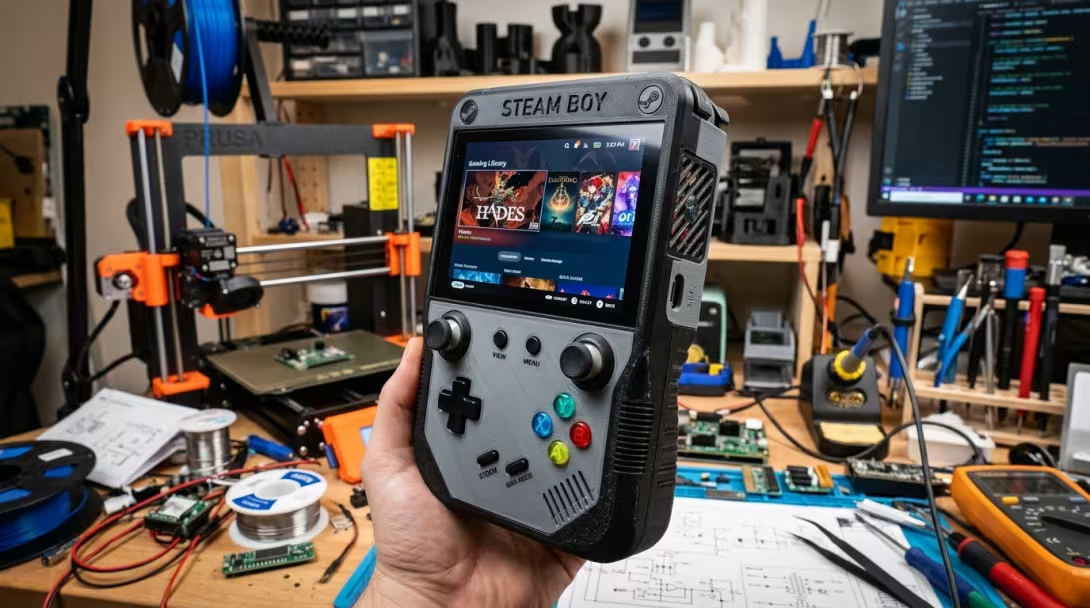
The undisputed centerpiece of recent community modding is a viral creation by Reddit hardware modder PhyFawkes (u/PhyFawkes) in the r/SteamDeckModded community: the "SteamBoy"—a radical project that transplants the full internal hardware of a Valve Steam Deck into a 3D-printed, vertical, Game Boy-sized chassis.
This guide covers the engineering story behind PhyFawkes' vertical SteamBoy, followed by essential step-by-step guides for NVMe SSD upgrades, GuliKit Hall Effect joysticks, BIOS UMA VRAM tweaks, CryoUtilities 2.0, and Decky Loader plugins.
🕹️ Headline Feature: PhyFawkes' Vertical 'SteamBoy' 3D-Printed Mod
1. The Engineering Feat & Reddit Project
Reddit modder PhyFawkes set out to answer a wild question: Can you turn a wide 7-inch Steam Deck into a vertical, single-handed classic Game Boy form factor?The result is the SteamBoy—a custom 3D-printed vertical shell that compresses the entire LCD Steam Deck motherboard, dual speakers, battery, and face controls into a vertical "sandwich" stack just 32mm thick.
- 🛠️ Reddit Teardown & Assembly Thread: r/SteamDeckModded — SteamBoy Teardown and Assembly
- 🎥 Reddit Demo & Video Thread: r/SteamDeckModded — SteamBoy Demo Video
- 👤 Creator Profile: u/PhyFawkes on Reddit
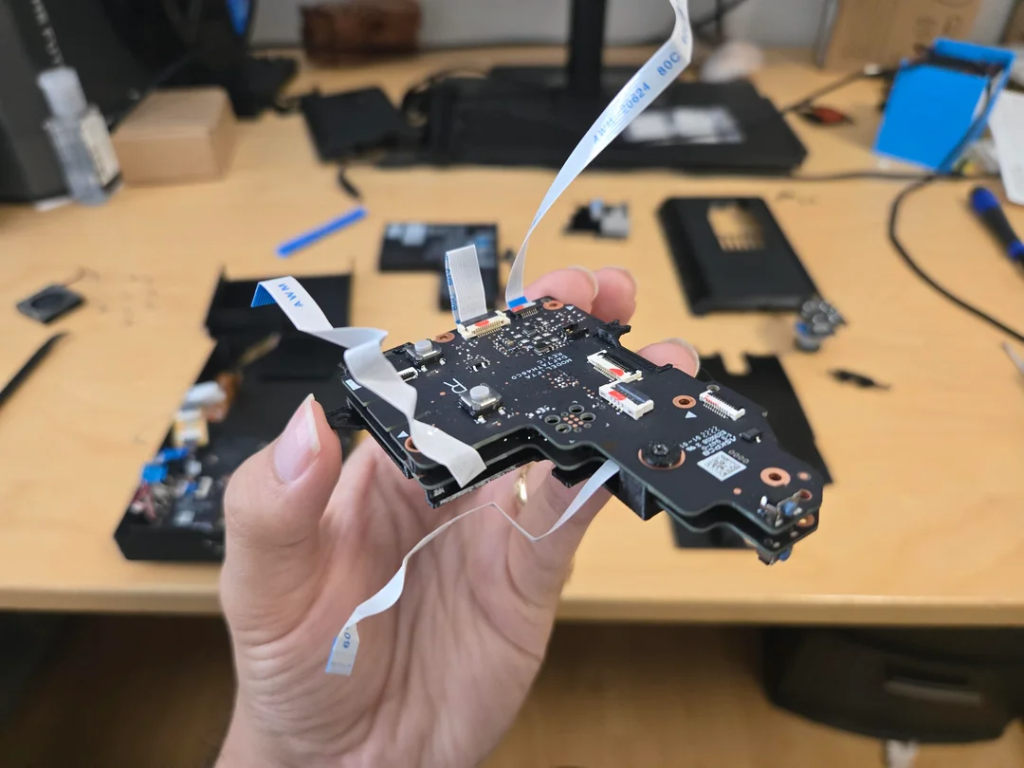
Real teardown photo of PhyFawkes' vertical Steam Deck ribbon cable and motherboard sandwich assembly.
2. Thermal Management & Undervolting
Because the compact 32mm vertical shell leaves no room for Valve's stock heatsink and blower fan, PhyFawkes engineered a custom cooling solution:
- 30x7mm Ultra-Compact Fan: Fitted with a custom 3D-printed mounting bracket over a slimmed-down heatsink.
- -50mV CPU/GPU Undervolt: By applying a -50mV undervolt across the AMD Aerith APU via custom BIOS settings, the vertical unit maintains stable operating temperatures (70°C–80°C) under load without thermal throttling.
3. The 1200x1080 90Hz AMOLED Screen Mod
Instead of retaining the wide 16:10 stock display, PhyFawkes integrated a high-density 1200x1080 90Hz AMOLED panel (originally designed for VR headsets). Connecting this custom display required a custom eDP adapter PCB and modified display timings flashed directly into the motherboard BIOS.
🛠️ Essential DIY Hardware Modifications
Whether you are building a custom chassis like PhyFawkes or upgrading your daily Steam Deck, these hardware mods deliver the highest performance return:
1. 💾 M.2 NVMe 2230 SSD Upgrade (Shader Cache & Storage Fix)
- Why It Matters: The stock 64GB eMMC drive fills up quickly from SteamOS Shader Pre-cache files (often 30GB+ for games like Apex Legends or Elden Ring).
- Drive Selection: Upgrade to a high-speed 1TB/2TB M.2 2230 NVMe drive (e.g. WD SN740 or Kioxia BG5).
- Safety Rule: ALWAYS remove your microSD card before unscrewing the rear shell! Leaving a microSD card inserted will snap it in half when prying the plastic clips open.
- Installation: Disconnect battery cable, transfer the silver thermal foil sleeve to the new NVMe drive, and reflash SteamOS using a recovery USB.
2. 🕹️ GuliKit Hall Effect Joysticks (Permanent Drift Elimination)
- The Friction Problem: Factory joysticks use potentiometers with resistive graphite wipers that wear down from friction, causing permanent stick drift.
- The Electromagnetic Solution: GuliKit Hall Effect joysticks use non-contact magnetic position sensors. Because there is zero physical contact between moving components, they are immune to drift permanently.
- Calibration Protocol: Reconnect the capacitive touch sensor wire, zero out the physical magnetic center using the GuliKit PCB button, and run the Linux software calibration tool in Desktop Konsole:
cp /usr/bin/thumbstick_cal ~/thumbstick_cal
chmod +x ~/thumbstick_cal
./thumbstick_cal
⚡ System Performance & BIOS Optimization
1. ⚙️ 4GB BIOS UMA Frame Buffer Allocation
By default, SteamOS reserves a conservative 1GB VRAM buffer for the GPU. Increasing this in the BIOS eliminates 1% low frame drops in VRAM-demanding AAA titles: 1. Power off ➔ hold Volume Up (+) + press Power to enter BIOS Setup Utility. 2. Navigate to Advanced ➔ change UMA Frame Buffer Size from 1G to 4G. 3. Save & Exit (F10).
2. 🚀 CryoUtilities 2.0 (Memory & Swappiness Optimization)
Created by Linux developer CryoByte33, CryoUtilities optimizes SteamOS memory management:- 16GB Swap File: Expands virtual memory overhead to prevent Out-of-Memory (OOM) game crashes.
- Swappiness = 1: Forces SteamOS to prioritize fast physical LPDDR5 RAM over disk paging, stabilizing frame pacing.
🧩 Software Customization — Decky Loader Plugins
Install Decky Loader in Desktop Mode to unlock essential Quick Access Menu plugins:
| Plugin | Key Capability |
|---|---|
| PowerTools | Toggles SMT threads for emulators (Yuzu, PCSX2) & locks GPU clock frequency. |
| CSS Loader | Applies custom UI themes (Obsidian, Nord, Material). |
| ProtonDB Badges | Displays real-time Linux compatibility ratings (Platinum, Gold, Borked) on library cards. |
| Animation Changer | Custom boot animations from SteamGridDB. |
🎯 Summary
From PhyFawkes' vertical 3D-printed SteamBoy (r/SteamDeckModded Subreddit) to NVMe 2230 storage swaps and CryoUtilities tweaks, the Steam Deck stands out as the ultimate open handheld for DIY hardware modders.