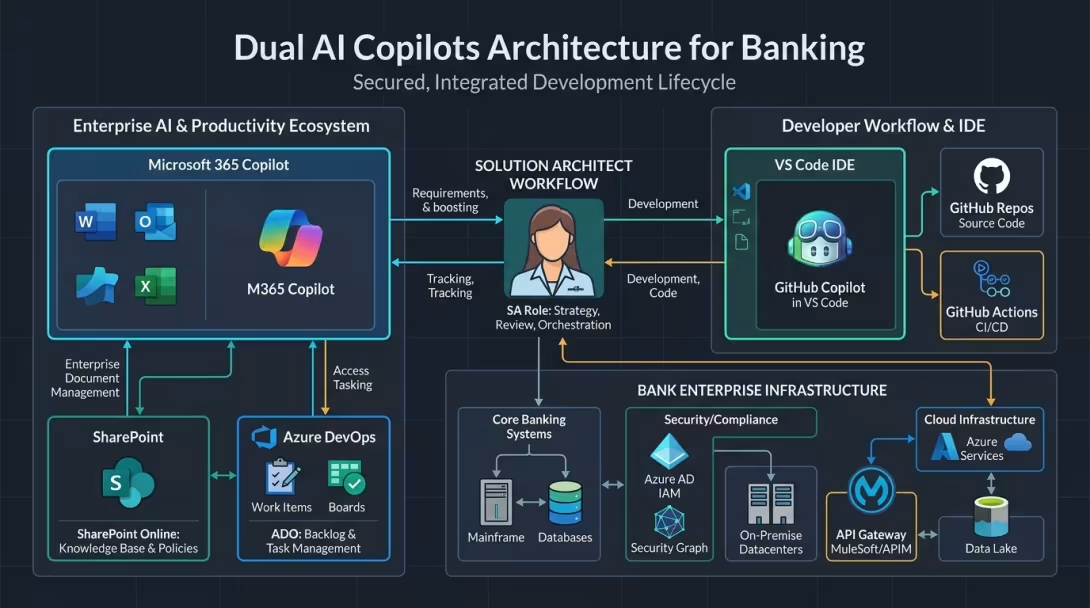
Bridging the AI Gap in Enterprise Banking: Autonomous Agents vs. Corporate Copilots
Orchestrating autonomous AI patterns within standard enterprise tooling to drive speed, alignment, and clarity across banking domains.
📌 AI Architecture Series (Part 3 of 3)
This post covers operationalizing agentic workflows inside enterprise banking perimeters. For background see part 1: Architecting an Autonomous Content Pipeline: From Video Streams to Drupal Nodes via Drush and check part 2 Inside Google Antigravity: How Autonomous AI Agents Are Redefining Engineering Velocity.
💡 The Core Hypothesis
Core Hypothesis: By pairing Microsoft 365 Copilot (for enterprise context synthesis across SharePoint, Confluence, and Azure DevOps Work Items) with GitHub Copilot Agent Mode (for code repository indexing and structured drafting), Solution Architects can emulate up to 80% of an autonomous agent workflow (like Google Antigravity) within approved corporate boundaries—without bypassing security policies or requiring immediate CISO escalation.
🎯 Opportunity & Horizon: Bridging High-Velocity Agentic AI with Enterprise Governance
As a Solution Architect working on personal projects, using autonomous AI platforms like Google Antigravity feels like unlocking a superpower. The speed, convenience, and contextual awareness are transformative. When setting up an end-to-end workflow—from project scaffolding and continuous testing to multi-file refactoring and documentation—Antigravity acts as a force multiplier. It bridges knowledge gaps across infrastructure, code patterns, and tooling pipelines in minutes.
In an enterprise banking environment, we operate within a well-established governance framework: regulated financial institutions prioritize risk management, DORA compliance, ECB guidelines, and strict client data perimeters. Introducing brand-new custom software binaries follows formal CISO evaluation pathways.
However, as forward-looking architects, we don't need to pause our pursuit of engineering velocity while tool ecosystems mature. Instead of waiting for top-down shifts, the constructive question becomes: How can we operationalize agentic workflow patterns using the standard enterprise stack already on our workstations—specifically GitHub Copilot and Microsoft 365 Copilot?
🏛️ Underlying Principle: Mutual Understanding & Area Clarity
In a large banking ecosystem, architecture is not an academic exercise in drawing diagrams that gather dust on SharePoint.
Architectural friction in enterprise engineering usually stems from three knowledge chasms:The fundamental purpose of architecture is providing clarity on target state design and security boundaries, and fostering mutual understanding on trade-offs, delivery constraints, and cross-area handoffs—both within our Area and between Areas—so squads can execute with confidence.
1. Context Fragmentation: Business goals live in restricted SharePoint sites; enterprise standards and compliance rules live in separate central portals; Area architecture documentation resides in Confluence; and actual implementation truth lives in Azure DevOps (ADO) git repositories and work items.
2. Ambiguity in Guardrails: Squads sometimes struggle to discern what is explicitly allowed versus forbidden regarding security patterns, approved tools, and reference architectures.
3. Architectural Drift: Squads build features under tight sprint deadlines, creating unspoken code and process deviations from the target architecture that Product Owners (POs) and architects only discover months later.
By streamlining how we synthesize context and draft deliverables, AI tools allow architects to spend less time hunting down documentation links and formatting specs, and more time driving active alignment with squads, POs, and domain leadership.
🪜 Steps Taken: Deconstructing the Journey to Conclusions
Closing the gap between autonomous AI agents and standard corporate copilots requires a systematic five-step methodology:
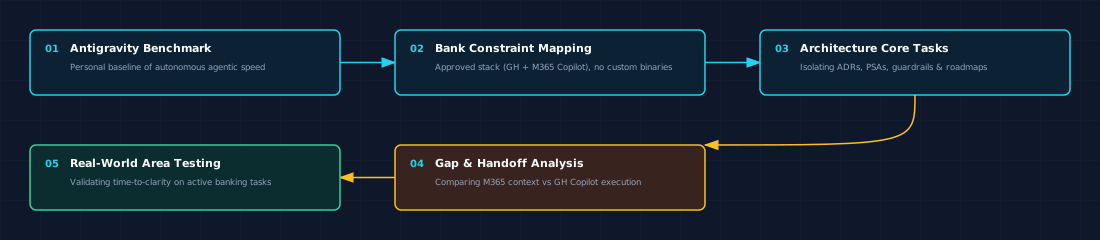
Diagram: Five-step systematic approach to deconstructing agentic workflows and mapping enterprise copilot handoffs.
Step 1: Benchmark the Personal Ideal (Antigravity)
Benchmarking autonomous agent platforms like Antigravity highlights six core capability dimensions that drive engineering velocity:- Autonomous Multi-Step Planning: Native architectural roadmap generation with step-by-step verification prior to execution.
- Multi-File Scaffolding & Refactoring: Scaffolding cross-package schemas, APIs, and data models simultaneously in a single pass.
- Deterministic Self-Healing (Run → Fail → Fix): Spawning headless sub-shells, executing unit tests, reading stack traces, and iterating automatically until passing.
- Artifact & UI Verification: Capturing browser recordings, DOM snapshots, and visual validation diffs during test execution.
- Enterprise Knowledge Synthesis: Deep native context pulling across Jira/ADO, Confluence, local documentation, and codebases.
- Autonomous MCP Tool Chaining: Deeply woven multi-agent workflows that chain multiple Model Context Protocol (MCP) tools automatically across parallel subtasks.
Step 2: Map Workplace Constraints & Bank Policy Baseline
Establishing the operational baseline requires a clear inventory of the Bank's approved feature boundaries:- Allowed GitHub Copilot Feature Set:
- Inline Code Autocomplete: Real-time context-aware snippet completions within approved IDEs (VS Code / JetBrains).
- Copilot Chat with
@workspaceIndexing: Querying local repository symbols, functions, and file relationships within the active workspace session. - Repository Architecture Instructions (
.github/copilot-instructions.md): Custom workspace guidance files to steer AI completions toward approved Area tech stacks, logging standards, and security rules. - Manual Terminal Command & Error Explanation: Explaining build/test failure traces and suggesting CLI fix commands (requiring explicit developer review and manual execution).
- Strictly Restricted / Blocked Features:
- No Autonomous Agent Mode / Unmonitored Sub-shells: Unmonitored background execution loops and autonomous multi-step file modifications are restricted.
- No Automated PR Creation or Auto-Commits: All git commits, branch creation, and pull request submissions require explicit human developer action.
- Public Code Match Filtering Enforced: Suggestions matching public GitHub code repositories (>150 characters) are automatically blocked at the enterprise policy level.
- Zero Data Retention (ZDR) & Enterprise Perimeter: Prompts and code telemetry remain strictly within enterprise data perimeters and are never retained for model retraining.
- MCP Security & Tool Governance: Enterprise admin policies enforce prompt-by-prompt developer confirmation for tool calls and restrict MCP connections to approved read-only servers, blocking high-risk mutation calls (e.g., preventing write/delete queries against production databases).
Step 3: Deconstruct Core Architect Deliverables
Core deliverables required of an Area Architect split into four primary outputs: 1. Architecture Decision Records (ADR) & Project Start Architectures (PSA): High-impact specification documents pulling from Azure DevOps work items, SharePoint standards, Confluence docs, and git codebases. 2. Governance & Tech Stack Boundaries: Maintaining clear visibility over allowed tools, approved libraries, and security policies. 3. Deviation Identification & Remediation: Detecting code and process drift early and establishing actionable alignment plans with POs and squads. 4. Roadmap Execution: Translating macro architecture strategy into concrete plans of approach and technical epics.Step 4: Conduct Comprehensive Capability Gap Analysis
A comprehensive capability evaluation maps approved enterprise tools against the autonomous agent baseline across all feature dimensions:| Feature Dimension | Google Antigravity Experience | Approved MS Stack (GitHub Copilot + M365 Copilot) | Gap Status & Severity | Workaround / Bridge Strategy | Enterprise Banking Impact |
|---|---|---|---|---|---|
| Autonomous Multi-Step Planning | Native architectural roadmap generation (adaptive, task-complexity triggered) with step-by-step verification before execution. | VS Code Copilot Chat / Plan Prompts: Generates structured markdown plans prior to manual file edits. | Minor Gap | Explicitly prompt Copilot Chat to generate a .md implementation plan before making code modifications. |
Enforces plan-first review before committing changes to source control. |
| Multi-File Scaffolding & Refactoring | Scaffolds cross-package schemas, APIs, and models simultaneously in one pass. | Copilot Chat (@workspace): Multi-file symbol referencing with manual file edit application. |
Moderate Gap | Use @workspace context combined with structured prompts. Manually specify impacted files or symbols to keep focus tight. |
Keeps refactoring scope explicitly constrained within squad repo boundaries. |
| Deterministic Self-Healing (Run → Fail → Fix) | Spawns headless sub-shells, executes unit tests, reads failure traces, and iterates automatically. | Copilot Terminal Integration: Explains error traces and suggests terminal commands for developer execution. | Moderate Gap | Developer runs test suite (e.g., enterprise CLI test runner), pastes error trace into Copilot Chat, and prompts: "Fix this error and provide updated code." | Maintains deterministic verification without giving AI uncontrolled shell access. |
| Artifact & UI Verification | Captures browser recordings, DOM snapshots, and visual validation diffs. | Not supported locally: Copilot only sees textual diffs and terminal stdout/stderr. | Major Gap | Write headless E2E / integration test assertion scripts that output structured textual logs that Copilot can inspect in the terminal. | Replaces visual inspection with verifiable text assertions in build pipelines. |
| Enterprise Knowledge Synthesis | Deep native context pulling from Jira/ADO, Confluence, local docs, and codebases. | M365 Copilot: Handles tenant docs (SharePoint/Teams); Copilot Enterprise: Indexes repos. | Architectural Split | Use Copilot for Work to extract requirements, architecture decisions, and specs from internal SharePoint/Confluence, then feed that brief directly into VS Code Copilot Chat. | Respects data perimeters between enterprise knowledge and code repos. |
| MCP Execution & Context Extraction | Deeply woven into multi-agent workflows; agents chain multiple MCP tools automatically across subtasks. | Client-configured in mcp.json / extensions: Tools require explicit developer approval prompts per call. |
Moderate Gap | Connect local MCP servers (local git, ADO, SQL) to enrich Copilot Chat. Review and confirm tool calls via prompt-by-prompt gating. | Granular prompt-by-prompt tool gating provides safety; Antigravity provides faster autonomous chaining. |
| MCP Tool Policy & Governance | Supports granular tool-level allowlists (mcp(server/tool)) and sandbox restrictions. |
Enterprise admins restrict extensions and configure policies for allowed MCP connections. | Equivalent Controls | Admins configure enterprise policy to allow read-only MCP connectors, blocking write/delete tools on production databases. | Both allow blocking high-risk tool calling to protect production databases. |
Step 5: Validate the Dual-Engine Handoff Protocol
Validating this emulated workflow across live banking tasks provides concrete benchmarks for time-to-clarity on ADRs, PSAs, and deviation briefs.🔌 Architectural Interoperability via Model Context Protocol (MCP)
Model Context Protocol (MCP) provides the standardized JSON-RPC integration layer to connect LLM agent loops to internal databases, tools, and enterprise systems without direct, uncontrolled access.
- GitHub Copilot / VS Code: Supports MCP in Copilot Agent Mode via an
mcp.jsonconfiguration file, allowing tool-calling against local/remote MCP servers with per-call confirmation prompts. - Google Antigravity: Natively bundles an MCP configuration engine (
.agents/mcp_config.json), allowing agents to autonomously chain database introspection, deployment telemetry, and workspace tools across parallel execution tracks. - Enterprise Security Properties of MCP in Banking:
- Zero Direct Access: Models generate structured tool requests; only the MCP server executes the backend call under strict developer/IAM credentials.
- Tool-Level Governance: Admins can enforce allowlists (
mcp(server/tool)) to block high-risk operations—preventing AI tools from executing write or delete commands on production databases. - Centralized Audit Boundary: All MCP tool payloads and responses can be intercepted, logged, and forwarded to central enterprise SIEM pipelines for compliance auditing.
🔍 Deep Dive: Replicating Banking Architecture Use Cases
1. Authoring ADRs and PSAs from Fragmented Sources
- The Challenge: A Project Start Architecture (PSA) requires pulling business scope from Azure DevOps Work Items, security requirements from SharePoint, and existing service boundaries from Azure DevOps git repos and Confluence.
- The Dual-Engine Solution:
@workspace and the provided M365 context block, draft sections 3 through 6 of the PSA focusing on API boundaries and data storage."
2. Establishing Guardrails: What Is Allowed vs. What Is Not
- The Challenge: Squads often reinvent the wheel or introduce unapproved dependencies because central architecture guidelines are buried in 50-page PDF documents.
- The Solution: Encode Area guardrails directly into the codebase using
.github/copilot-instructions.md.
# Area Architecture Guardrails & Instructions

## Approved Tech Stack & Standards
- Language Runtimes: Approved Enterprise LTS Runtimes (e.g., Java / .NET / Node.js)
- Application Frameworks: Enterprise Tier-1 Frameworks (Microservices & Frontend)
- Logging: Centralized Structured JSON Logger. Never print raw stack traces.

## Security & Compliance Guardrails
- Authentication: All REST endpoints must enforce OAuth2/OIDC token validation via Enterprise IAM.
- Database Access: Use parameterized queries / ORM layer. Raw SQL string concatenation is strictly forbidden.
- Secrets Management: Never commit credentials, tokens, or private keys. Reference Enterprise Secrets Vault.3. Spotting Architecture Deviations: Code vs. Process
Architectural drift isn't just about bad code patterns or unauthorized libraries; it frequently happens in the governance process itself.
🔍 Dual-Engine Audit Flow
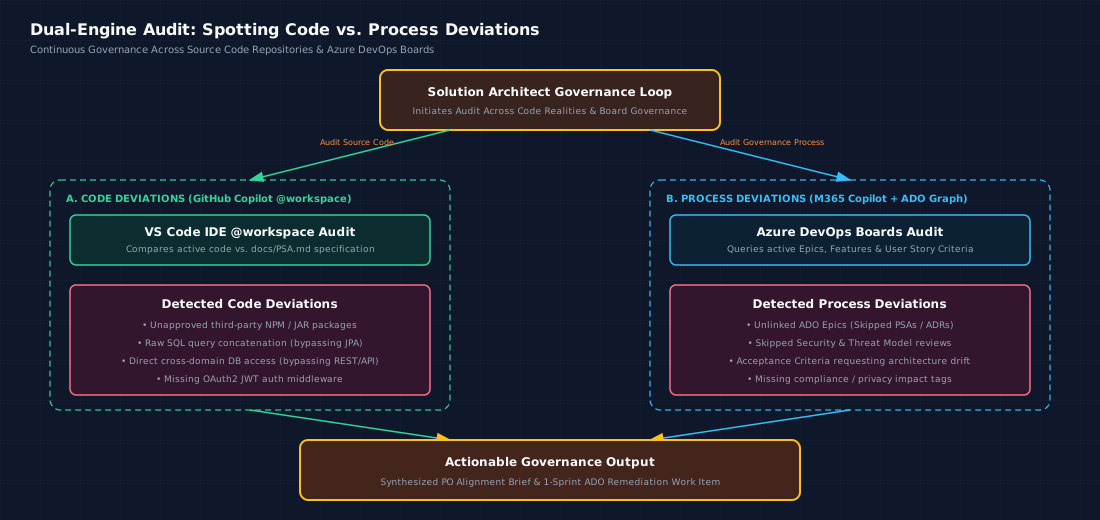
Diagram: Audit pathways for detecting code deviations (via GitHub Copilot @workspace) and process deviations (via M365 Copilot & ADO Boards).
A. Spotting Code Deviations (GitHub Copilot @workspace)
- How it works: Ask GitHub Copilot Agent Mode in VS Code: "Compare
@workspaceimplementation of the payment processing module against the architecture rules indocs/PSA.md. List any structural deviations or missing security checks." - Outcome: Instant detection of unapproved packages, direct database access across domain perimeters, or missing authentication middleware.
B. Spotting Process Deviations (M365 Copilot + Azure DevOps Work Items)
Process deviations occur when squads bypass mandatory governance gates during sprint delivery. Here is how Solution Architects can catch process drift early using M365 Copilot querying Azure DevOps Boards:- Unlinked Work Items (Skipped PSAs/ADRs):
- Audit Prompt:
"Scan Azure DevOps Epics in State 'In Progress' for Area [X]. Check if each Epic references an approved PSA document in Confluence or an attached ADR work item. Highlight any active Epics lacking mandatory architecture links." - Skipped Security & Threat Modeling Gates:
- Audit Prompt:
"Review ADO Features moving to 'Done' or 'Ready for Testing' in Sprint [N]. Flag any feature where the mandatory 'Security & Threat Modeling Review' checklist item remains unfulfilled or unassigned." - Architectural Drift in Acceptance Criteria:
- Audit Prompt:
"Analyze the Acceptance Criteria for all active User Stories in Board [Y]. Cross-reference them against our Area Guardrails (e.g. no direct database coupling between microservices). Identify any user stories whose acceptance criteria inadvertently demand an architectural anti-pattern."
4. Translating Strategy into Area Roadmaps
- The Challenge: High-level bank roadmaps (e.g., "Migrate all domain events to EventHub/Kafka by Q4") are often too abstract for squads to digest.
- The Solution: Use M365 Copilot to ingest the enterprise roadmap presentation, extract the technical directives relevant to your Area, and use GitHub Copilot to scaffold the initial technical requirements, Azure DevOps work item descriptions, and repository migration branches.
🚀 The Plan Forward: Blueprint for Your Area
To implement this workflow across your domain without waiting for CISO tool changes, adopt the following four-phase operational plan:

Diagram: Four-phase implementation roadmap for rolling out the Dual-Engine Copilot workflow across Area squads.
Phase 1: Standardize Artifact Templates (Week 1–2)
- Publish standardized, markdown-native templates for ADRs, PSAs, and Deviation Briefs in your Area's central Confluence / ADO documentation repository.
- Ensure all templates include explicit sections for Context, Decision, Consequences, Security Boundaries, and Squad Compliance Checklists.
Phase 2: Deploy Repository Instructions (Week 3–4)
- Add tailored
.github/copilot-instructions.mdfiles to every active Azure DevOps git repository in your Area. - Explicitly define approved tech stacks, forbidden libraries, logging standards, and API patterns.
Phase 3: Train Squad Leads on the Dual-Engine Handoff (Month 2)
- Run workshops for Tech Leads and Solution Architects demonstrating the Two-Pass Handoff Protocol:
- Establish shared prompt libraries for common tasks (PSA drafting, process deviation auditing, security compliance checks).
Phase 4: Build the Evidence Base for Future Agentic Tooling (Long Term)
- Track qualitative and quantitative wins within your Area:
- Reduction in time spent drafting PSAs/ADRs (e.g., from 3 days to 4 hours).
- Decrease in code and process non-compliance items caught during governance reviews.
- Use empirical data gathered from this emulated workflow to present a compelling, low-risk business case when your organization is ready to pilot dedicated autonomous agent platforms like Google Antigravity under formal governance.
🧠 Architectural Reflection: Who Owns the Brain?
A fundamental difference between autonomous AI platforms (like Google Antigravity) and standard corporate copilots (GitHub Copilot + M365 Copilot) lies in state management and memory ownership—what logging outputs often reference as "the brain".
In an autonomous agent environment like Antigravity, the AI owns a single, unified brain. It maintains a persistent state graph across conversation transcripts, file modifications, terminal command execution logs, and subagent task delegations. It holds the complete feedback loop from initial planning to code execution and test verification in one place.
In the enterprise copilot stack, the brain is split by design across security perimeters:
1. The Enterprise Brain (M365 Copilot): Owned by the enterprise tenant. It holds organizational memory, business intent, regulatory boundaries (DORA/ECB), and ADO board history. However, it has zero real-time awareness of unsaved local code edits or IDE workspace buffers.
2. The Codebase Brain (GitHub Copilot): Owned by the local workspace and repository context (@workspace symbol graphs and .github/copilot-instructions.md). It understands code structure deeply, but has zero native awareness of SharePoint policies or ADO board discussions.
3. The Human Solution Architect (The Master Orchestrator): Because no single AI binary is permitted to hold a unified enterprise-wide state graph, the Architect becomes the central state bridge.
The Architect acts as the "transitional brain", extracting business context from M365 Copilot and feeding it into GitHub Copilot Agent Mode via structured handoffs. Recognizing that the enterprise brain is split helps architects understand why cognitive friction occurs—and why their role as the orchestrator of context is more vital than ever.
🎯 Conclusion
You don't need to wait for ideal organizational conditions to work with architectural speed and clarity. By recognizing the strengths of the tools already sitting on your corporate workstation—M365 Copilot for enterprise knowledge extraction & process auditing and GitHub Copilot for technical execution—you can build a pragmatic, highly effective workflow that delivers clarity to your squads today.
Autonomous agents like Antigravity show us the future of engineering velocity. By deconstructing why they work and orchestrating their patterns within our enterprise framework, pragmatic Solution Architects can lead the way forward today.
Do you have questions or custom prompt templates you use in your enterprise copilot stack? Share your thoughts and let's keep refining the enterprise AI blueprint!