
Escaping AI Studio Vendor Lock-In: PoC 1 vs. PoC 2
TL;DR
- The trap: All-in-one AI studio platforms make prototyping effortless, right up until your deployed app is hard-wired to one vendor's SDK, API key pattern, and per-call pricing.
- The pattern: "Design in Studio, Execute Behind an Abstraction"—keep the studio for rapid UI and prompt iteration, but enforce four runtime boundaries: versioned prompts/schemas in Git, adapter-isolated vendor hints, strict output contracts, and a swappable
/api/*gateway. - Two migration paths: PoC 1 keeps AI Studio Build in the loop while routing
fetchcalls to Cloudflare Workers AI behind a server proxy (1-hour timebox). PoC 2 uses AI Studio once to scaffold, then moves code, CI/CD, and secrets to GitHub + IDE + Cloudflare Workers. - Real-world result: PoC 1 actually worked until hitting the spend limit. Moving to PoC 2 (
Interior-snapper-cloudflare) kept Llama 4 Scout + FLUX.2 on Cloudflare's free tier in production, and added Ollama + ComfyUI on a local GPU as a fallback whenever cloud limits are reached.
Situation & Complication
Building an app inside a vendor's all-in-one AI Studio feels frictionless: you prompt the UI, test multimodal calls in the playground, and click deploy. For Interior-snapper—an app that photographs a room, extracts structured spatial JSON, and renders an isometric cutaway diorama—that setup got a working prototype live in hours.
The complication showed up as soon as the app ran in the wild:
1. Runtime vendor model lock-in. The app depended directly on @google/genai and Gemini models for both image metadata inference and image generation.
2. Client-side credential exposure. Studio-generated SPAs default to bundling GEMINI_API_KEY into the frontend.
3. Run cost. Paid image generation per room adds up fast on a hobby project.
The architectural question became: How do we keep leveraging a studio's fast prompting features while avoiding vendor model lock-in at runtime?
Core Pattern: "Design in Studio, Execute Behind an Abstraction"
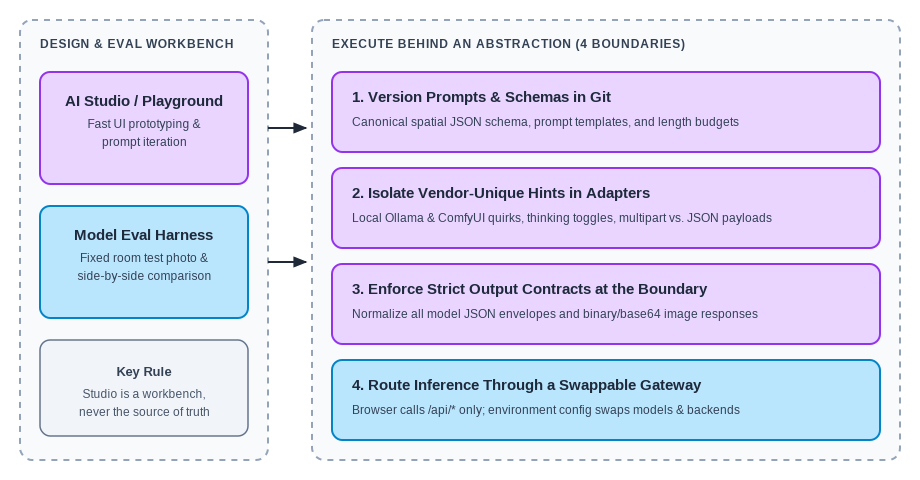
Diagram: Separating prompt design from runtime execution across four boundaries (Image: endegraaf.nl).
Studio-unique features—prompt playgrounds, system instruction templates, and provider-specific structured-output hints—are most valuable during iteration, not as hard-coded runtime dependencies. You can keep that speed without the lock-in by enforcing four boundaries:
1. Version Prompts & Schemas Outside the Studio UI
Treat the studio as a workbench, not the single source of truth. Export prompts, few-shot examples, and JSON schemas into Git so they are diffable and testable across candidate models.
2. Isolate Vendor-Unique Hints in an Adapter / Capability Layer Keep the core prompt intent model-agnostic. Map vendor-specific quirks—like thinking-mode toggles, structured-output flags, or reference-image multipart encoding—inside a provider adapter. If another model lacks a niche flag, emulate it in prompt text or degrade gracefully. 3. Enforce Strict Output Contracts at the Boundary Validate metadata inference against a canonical schema (JSON Schema / Zod) at the application boundary. As long as Model A and Model B return valid JSON matching that contract, the rest of your app stays unchanged. 4. Route Inference Through a Swappable Gateway / SDK Layer Never call raw vendor SDKs from frontend or business logic. Put a thin backend gateway (Why not keep the Studio as the source of truth? In PoC 1, the Studio does act as your app harness—it holds the UI, prompts, and deployment loop. The catch is that its code-gen agent can silently revert custom
fetchcalls back to its own SDK during follow-up UI tweaks, and its built-in playground can't run the exact same prompt and schema across external providers (like Cloudflare Workers AI and a local GPU). Moving to PoC 2 promotes Git to the source of truth and demotes the Studio to a scratchpad.
/api/*) in front of inference calls so swapping models or providers is a configuration change rather than a rewrite.
Lock-In Risk by Workload
Not all AI calls carry the same migration risk:
| Workload | Lock-In Risk | Practical Mitigation |
|---|---|---|
| Image metadata inference | Medium — prompt phrasing and structured-output modes tune to one model's quirks. | Lock down a strict JSON output schema, store prompt templates in Git, and run an evaluation set across candidate models. |
| Image generation | High — aspect ratios, style flags, reference-image inputs, and prompt-following styles differ sharply across models. | Normalize common parameters (dimensions, prompt budget, reference image) in your adapter and isolate vendor-only flags. |
PoC 1 vs. PoC 2: Choosing the Migration Path
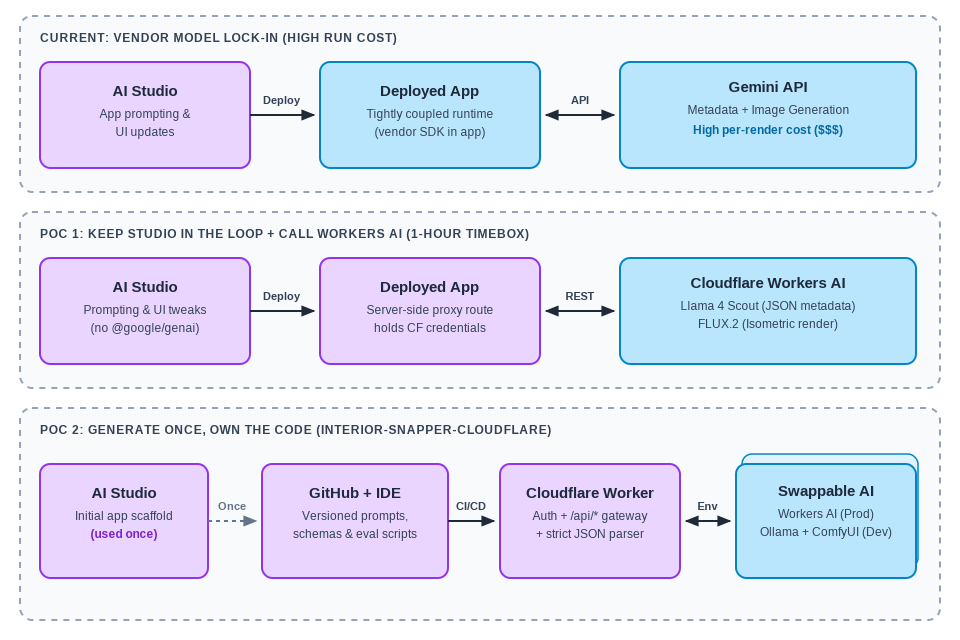
Diagram: Current state vs. PoC 1 (thin abstraction inside Studio) vs. PoC 2 (export to GitHub + IDE + Cloudflare) (Image: endegraaf.nl).
PoC 1 (Preferred First Test): Keep AI Studio in the Loop + Call Workers AI
You continue using AI Studio's interactive builder for UI tweaks and deployment, but explicitly instruct it to generate standard fetch calls to a server-side proxy that calls Cloudflare Workers AI instead of @google/genai.
Run this as a strict 1-hour timebox to validate two known friction points:
- Security / API Keys: Pure frontend SPAs will expose
CLOUDFLARE_API_TOKENand hit CORS errors. You must verify AI Studio scaffolds a server-side proxy route holdingCLOUDFLARE_ACCOUNT_IDandCLOUDFLARE_API_TOKEN. - Code-Gen Bias: AI Studio strongly prefers
@google/genai. Paste the exact REST request/response shapes for Llama 4 Scout and FLUX.2 into your prompt, then run two follow-up UI prompts to verify it does not silently revert to Gemini.
PoC 2 (Fallback / Full Ownership): Scaffold Once → GitHub + IDE + CI/CD
Trigger PoC 2 if AI Studio repeatedly fights your prompt and re-injects @google/genai, or if your backend needs richer logic (retries, strict schema normalization, local model routing, or object storage). You trade instant "prompt-to-deploy" in the Studio UI for full control over dependencies, secrets, and adapters.
How Both PoCs Played Out in Practice
In practice, PoC 1 worked too: AI Studio Build was able to keep the Cloudflare Workers AI calls intact behind a server proxy—until we hit the spend limit. Once that quota refreshed, PoC 1 remained viable, but hitting that ceiling pushed us to formalize PoC 2 (Interior-snapper-cloudflare, detailed in the companion post, Moving Interior-snapper from Gemini to Cloudflare's Free Workers AI).
Looking at how PoC 2 behaves in practice shows where the abstraction pays off:
- Strict Output Contracts: A single shared spatial JSON schema defines the room type, layout summary, architectural features, and furniture items with their physical supports. One boundary parser unwraps Cloudflare Workers AI envelopes, OpenAI-style chat responses, and Ollama payloads into that same contract, while the image endpoint normalizes raw binary streams and base64 payloads into a uniform data URL.
- Spend-Limit Fallback via Local GPUs: Production runs Llama 4 Scout and FLUX.2 klein on Cloudflare's free tier. Whenever the daily neuron allowance or spend limit is reached, flipping two environment flags routes the exact same
/api/*endpoints to a local GPU running Qwen3-VL in Ollama and FLUX.2 in ComfyUI—so testing and room rendering never stall. - Model-Specific Quirks Isolated:
- The local Ollama adapter disables thinking mode for Qwen3-VL, caps the item list, and deduplicates repeated items so a 4B model cannot loop infinitely on
"Book". - The image adapter handles both reference-image multipart uploads and text-only JSON models, appending a short style reminder at the end of long prompts so reference-image models don't copy the photo's eye-level camera angle.
- Repeatable Model Evaluation: A single living-room test fixture lets a comparison script benchmark cloud Workers AI models side-by-side against local ComfyUI runs using the exact same prompt.
A Lesson Learned: Watch for Prompt Drift
Even after moving off a vendor platform, duplicating prompt builders across runtimes creates subtle drift. In this project, both the Cloudflare Worker and the local Express dev fallback implement the API routes. Over time, the Worker gained larger prompt budgets, the style reminder, and the local GPU adapters, while the Express fallback kept an older, shorter prompt slice.
Keeping prompts and backend adapters in one shared module is the natural next step—and a good reminder that owning the code in Git is what makes spotting and fixing that drift straightforward.